Download free DWG billiard table blocks
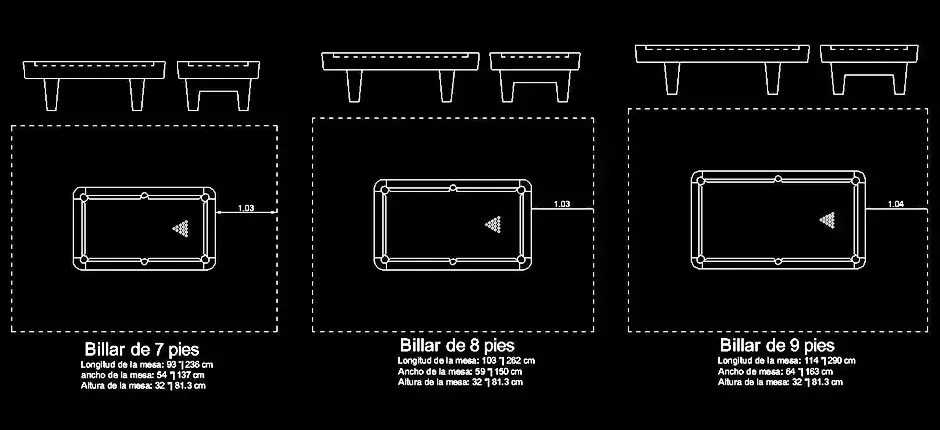
Download free DWG billiard table blocks to speed up the creation of clean, professional CAD drawings for leisure, sports, architectural, and interior design projects. This DWG block set is made to help designers and drafters save time while producing clear layouts that are easy to read and ready for presentation or technical documentation.
The file includes billiard tables in multiple sizes, with plan, front, and side views so you can evaluate space requirements and surrounding clearances more accurately. These blocks are especially useful for designing game rooms, clubs, hotels, recreation centers, and lounge areas, where realistic furniture placement and correct proportions are essential for a convincing layout.
Using this type of recreational furniture block makes it easier to check circulation paths, free space around the table, activity zones, and the actual footprint of the equipment within the room. Each element can be moved, copied, scaled, or added to your existing DWG symbol library depending on the needs of your project.
For the most accurate results, it is recommended to verify drawing units, available dimensions, and safety distances around the billiard table after insertion. That makes these blocks suitable both for early concept studies and for more detailed presentation drawings where spatial organization matters.
You can download free DWG billiard table blocks and use them in AutoCAD, AutoCAD LT, AutoCAD for Mac, and other native DWG-compatible AutoCAD alternatives such as BricsCAD, ZWCAD, DraftSight, GstarCAD, progeCAD Professional, nanoCAD, and CMS IntelliCAD. They can also be integrated into BIM and architectural design workflows with software like Autodesk Revit, Archicad, Vectorworks, Allplan, and SketchUp Pro.
The same file may also be useful in mechanical CAD and 3D modeling environments such as SolidWorks, Autodesk Inventor, Autodesk Fusion, and Rhino 3D, as well as in free or open-source alternatives like LibreCAD, QCAD Professional, and FreeCAD. Depending on the software you use, it is a good idea to check scale and units after importing the drawing.