Download free front-view traffic sign blocks in DWG format.
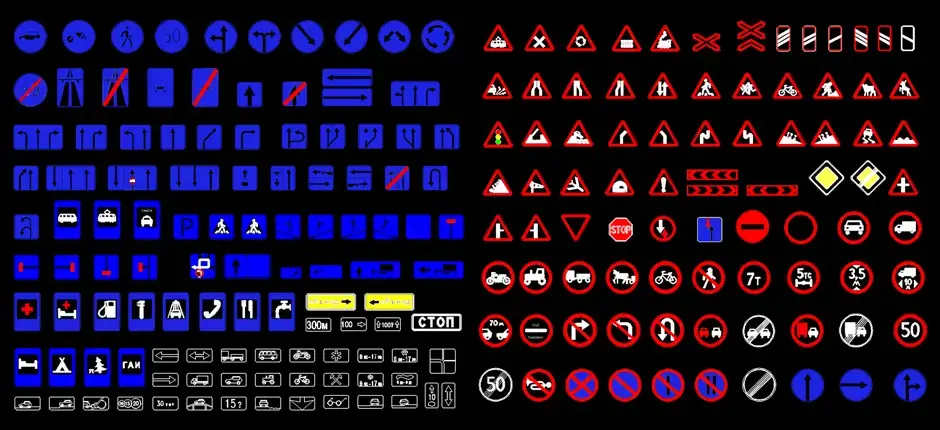
Download free front-view traffic sign blocks in DWG format to quickly enrich drawings for street furniture, exterior architecture, landscape design, and public space planning. This file gives you clean, accurate, and easy-to-read symbols that can be inserted directly into technical drawings, helping you save time and avoid redrawing standard road signage from scratch.
These blocks are well suited to roadwork documentation, traffic studies, site layout plans, municipal projects, and signage schemes. Each symbol can be placed in a layout, moved, duplicated, scaled, or added to your own DWG symbol library depending on the needs of the project.
This download is especially useful for showing traffic signs and road signal elements in roadway plans, road safety studies, and urban development projects. Using clear front-view signage blocks helps improve drawing readability, supports better organization of outdoor spaces, and makes project documents look more professional for clients, engineering teams, and site crews.
These symbols also make it easier to communicate traffic rules, restricted areas, and regulated zones within a plan. For the most reliable result, it is still recommended to check the drawing scale, unit settings, and required clearances after importing the block into your CAD software.
The DWG block can be imported and used in AutoCAD, AutoCAD LT, AutoCAD for Mac, as well as in native DWG AutoCAD-compatible software such as BricsCAD, ZWCAD, DraftSight, GstarCAD, progeCAD Professional, nanoCAD, and CMS IntelliCAD.
It can also be used in BIM and architectural software including Autodesk Revit, Archicad, Vectorworks, Allplan, and SketchUp Pro; in mechanical CAD and 3D modeling tools such as SolidWorks, Autodesk Inventor, Autodesk Fusion, and Rhino 3D; and in free or open-source alternatives like LibreCAD, QCAD Professional, and FreeCAD.