Download free DWG blocks of modular children’s playground equipment in plan and elevation
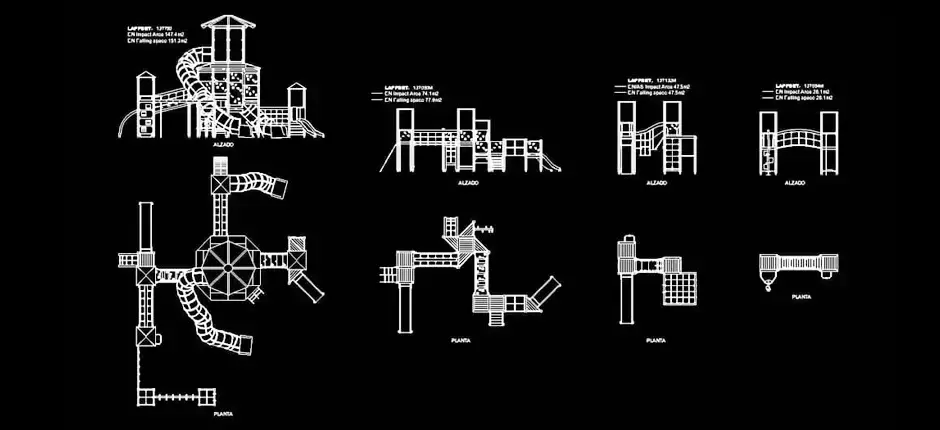
Download free DWG blocks of modular children’s playground equipment in plan and elevation to speed up the preparation of urban furniture, landscape, exterior architecture, and public space drawings. These CAD blocks are designed to help you place clear, accurate playground elements directly into technical plans without having to redraw them from scratch.
This resource is ideal for parks, schools, residential developments, public gardens, leisure centers, and family-oriented outdoor spaces. The blocks can be inserted into site layouts, moved, duplicated, scaled, or added to an existing DWG symbol library to match the specific requirements of each project.
If you need to represent modular play systems for recreational areas with towers, bridges, slides, and combined structures, this download offers a practical solution. It helps make plans easier to read, supports better organization of outdoor areas, and allows you to present cleaner, more professional documentation to clients, consultants, and construction teams.
These DWG blocks are especially useful when planning larger or more detailed play zones, where circulation paths, access points, and safety clearance around each module must be considered. After importing the file into your software, it is still recommended to verify the scale, drawing units, and required free space to ensure accurate project integration.
The DWG file can be imported and used in AutoCAD, AutoCAD LT, AutoCAD for Mac, and other native DWG-compatible AutoCAD alternatives such as BricsCAD, ZWCAD, DraftSight, GstarCAD, progeCAD Professional, nanoCAD, and CMS IntelliCAD.
It can also be used in BIM and architectural software including Autodesk Revit, Archicad, Vectorworks, Allplan, and SketchUp Pro, as well as in mechanical CAD and 3D modeling applications such as SolidWorks, Autodesk Inventor, Autodesk Fusion, and Rhino 3D. Free and open-source alternatives like LibreCAD, QCAD Professional, and FreeCAD can also work with this type of file depending on the workflow used.