Free 20- and 40-foot shipping container DWG blocks
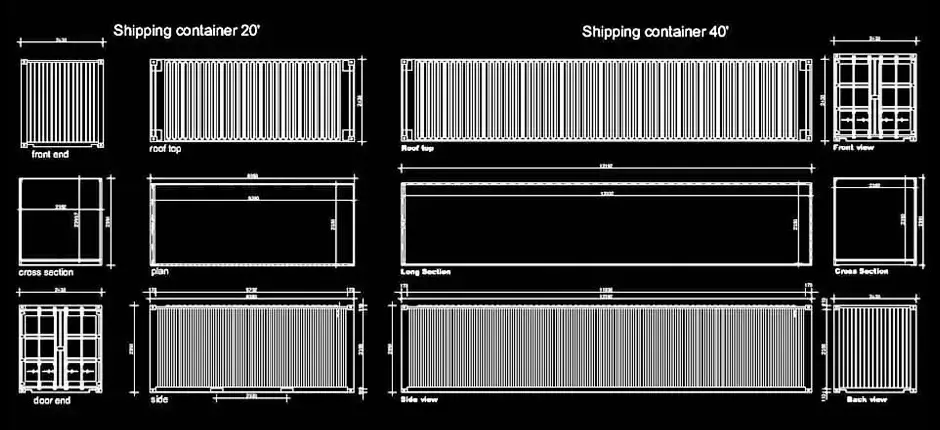
These Free 20- and 40-foot shipping container DWG blocks are created for quick integration into 2D CAD drawings, with balanced proportions and clean linework suited to professional layouts. They are a practical choice for transport plans, architectural drawings, urban planning documents, and technical site designs where readability, scale, and graphic consistency are essential.
The file provides plan views, elevations, sections, and side views, making it easy to insert standard shipping containers into many types of CAD documentation. It is particularly useful for industrial developments, construction site compounds, port areas, warehouses, and storage module layouts. The drawing remains simple and adaptable, so it can be edited to suit different levels of detail depending on the project.
These Free 20- and 40-foot shipping container DWG blocks are also valuable for parking layouts, traffic studies, construction logistics, and infrastructure planning. They help assess access widths, maneuvering space, visual clearance, and the real footprint occupied within a specific area. For more accurate presentations, the blocks can be resized, moved, duplicated, or added to an existing DWG symbol library.
The DWG file can be imported into AutoCAD, AutoCAD LT, AutoCAD for Mac, as well as other native DWG-compatible CAD platforms such as BricsCAD, ZWCAD, DraftSight, GstarCAD, progeCAD Professional, nanoCAD, and CMS IntelliCAD. It can also be used in BIM and architectural software including Autodesk Revit, Archicad, Vectorworks, Allplan, and SketchUp Pro.
It also fits well into mechanical CAD and 3D modeling workflows with software such as SolidWorks, Autodesk Inventor, Autodesk Fusion, and Rhino 3D, along with free and open-source alternatives like LibreCAD, QCAD Professional, and FreeCAD. After importing the file, checking scale and units is recommended to ensure accurate placement in your drawing.
One of the main advantages of these Free 20- and 40-foot shipping container DWG blocks is their flexibility in technical documentation. They can be used to test layout options, compare design solutions, or improve presentation sheets without having to redraw standard containers from scratch. This saves time while maintaining a clean, consistent, and professional result.