Download free complete traffic sign blocks in DWG
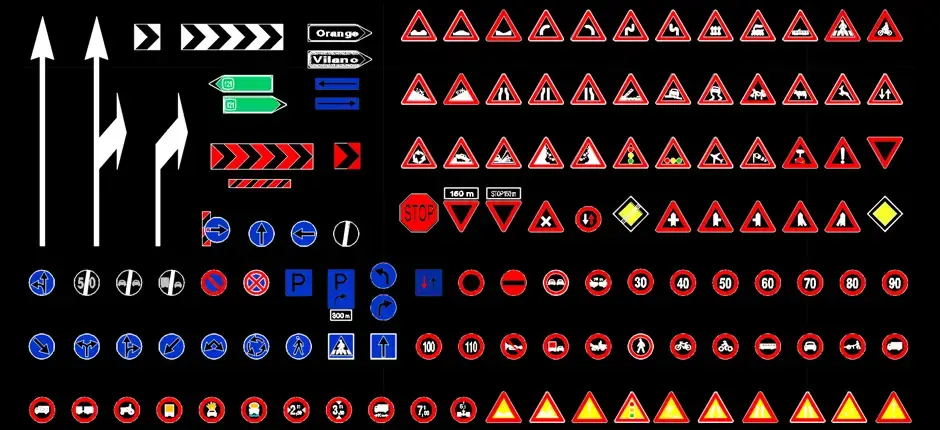
Download free complete traffic sign blocks in DWG to speed up the preparation of urban furniture drawings, exterior architecture plans, landscape layouts, and public space design documents. This DWG file gives you a ready-to-use set of clear, accurate traffic signs that can be placed directly into technical drawings without having to recreate them from scratch.
This resource is well suited for roadway plans, traffic studies, urban development projects, parking layouts, site access drawings, and signage schemes. Each block can be inserted into a plan, moved, copied, scaled, or added to an existing DWG symbol library to match the needs of your project workflow.
If you need to represent warning signs, regulatory signs, information signs, directional signs, and related road markings, this download offers a practical solution. Using a consistent set of symbols helps improve drawing readability, organize outdoor spaces more effectively, and produce cleaner presentation documents for clients, engineering teams, and construction crews.
This pack is especially useful when you want a uniform signage style throughout the same drawing set, without mixing graphic standards from different sources. For the best results after import, it is recommended to verify the drawing scale, units, and required clearances in the software you are using.
The DWG block can be imported and used in AutoCAD, AutoCAD LT, AutoCAD for Mac, and in DWG-native AutoCAD alternatives such as BricsCAD, ZWCAD, DraftSight, GstarCAD, progeCAD Professional, nanoCAD, and CMS IntelliCAD.
It can also be used in BIM and architectural software including Autodesk Revit, Archicad, Vectorworks, Allplan, and SketchUp Pro, as well as in mechanical CAD and 3D modeling tools such as SolidWorks, Autodesk Inventor, Autodesk Fusion, and Rhino 3D. Free and open-source or low-cost alternatives like LibreCAD, QCAD Professional, and FreeCAD can also work with this type of file depending on your workflow.